 Fore Women Golf Association
| Establishing A Handicap Index | |
|---|---|
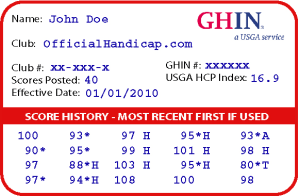 Sample GHIN Handicap Card |
A benefit of a FWGA/NCGA membership is being issued an official GHIN Number. When the GHIN Number is initially created, the handicap index is NH (No Handicap).
To establish a Handicap Index, a player must play and post a total of 54 holes, which can be made up of 9-hole and/or 18-hole scores. The handicap index represents your potential (demonstrated) scoring ability. It is expressed as a number with one decimal point (e.g. 21.4). It is an average number of strokes above par. The index itself is computed as a composite of your scores combined with the difficulty of the courses you played. Difficulty is determined by the Course Rating and Slope Rating of the course as set by the NCGA |
| World Handicap Index | How to Find the Course Handicap |
| What is Net Double Bogey? | How to POP a Score Card |
| Which Tees to Play From? | Where is My Home Course |
|
A general rule of thumb to determine which tee box is right for you is if you hit your driver under 200 yards, play from the closest tee (forward tees). If you hit from 200-225 the next farthest tee, and so on. When you are hitting 275+ accurately you should be playing the farthest tees back (the tips). |
Your home course is where you play & post most of your scores, or your home course is the golf course that you belong to. You can only have ONE home course. |
| Where Do I Post My Score? | How Do I Post My Scores?? |
|
WHS recommends using the USGA GHIN app on your iPhone to post your score hole by hole.
All the data & calculations for handicaps in the U. S. are managed via the GHIN Technology Platform. |
|
Daily Index |
|
| Calculated Using Best 8 out of 20 scores
. |
|
| Incomplete Holes – Most Likely Score | |
| For Pace-of-Play considerations, sometimes we need to “Pick-Up” or “X-Out”. Use the table at the right to estimate the number of strokes to add after the “Pick-Up”. | 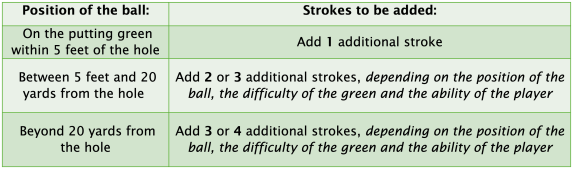 |



 Fore Women Golf Association