 Fore Women Golf Association
STEP 1 – Join the ClubCLICK HERE to go to the JOIN THE CLUB pageOnce you have completed the 2-step process, the following will take place to complete your membership:
|
|||||||||
STEP 2 – Stay Informed
All four of these programs have strong anti-spam protections for you. If you unsubscribe, you will no longer receive communications from FWGA. Because of the anti-spam feature, we are unable to add you back to the lists. Please do not unsubscribe from any of these platforms. |
|||||||||
STEP 3 – Learn How to Use Punchbowl for Casual Play
Punchbowl is an online Invitation-and-RSVP program we use to send members the CASUAL PLAY Tee Time Invitations. You can respond to this email either YES (you will participate in that event) or NO. The phone app and the desktop program provide the user a “Dashboard” that shows all the Casual Play invitations on one screen. Set up your Punchbowl account using the same email address you used for your FWGA membership. The punchbowl invitations are emailed and will show up in the punchbowl app. Please Click Here to Email the Casual Play Director if you wish to add more days of golf than what you indicated in your New Member Questionnaire. |
Click the buttons below to view videos from a 3rd-party YouTube site that help to delineate the Punchbowl interface in great detail. |
||||||||
STEP 4 – Golf Etiquette and Pace of PlayGolf etiquette and pace of play are important to know in order to keep the golf game moving along and to prevent delays for your foursome and the other players on the course. |
 Click to View Golf Etiquette and Pace of Play |
||||||||
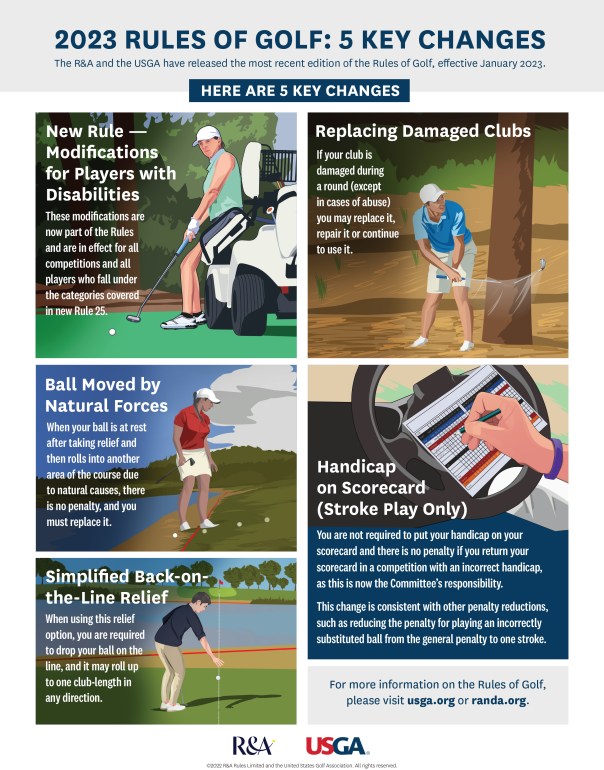
STEP 5 – Learn the Rules of GolfThe rules of golf can be overwhelming. As you play golf you will learn them. Watch this video to learn SITUATIONS & PENALTIES Watch this video for CHANGES to the RULES OF GOLF. Carry your Situations and Options card in your golf bag for reference. |
 |
||||||||
STEP 6 – Learn About Handicap Index and Posting GuidelinesThe handicap index represents your potential (demonstrated) scoring ability. It is an average number of strokes above par. Learn more about handicap index and posting scores. |
 Click to go to the Handicap Index & Posting Guidelines page |
||||||||
STEP 7 – Dress the PartSome golf courses are stricter about dress code than other golf courses. Please refer to the Golf Attire Guide for guidance. Below the guide is online shopping for clothes & equipment. |
 Click to go to the Golf Attire Guide page |
||||||||








 Fore Women Golf Association